Signing in and giving permission
Elena has a recurring grocery delivery at Juniper Market and wants Iris, her personal agent, to look after it. For that Iris needs access to her account. Elena gives it on Juniper's own page, in two separate steps: first to read, and later to propose changes. At the end she takes it back.
This page follows the access from the first sign-in to the sign-out, in Iris's conversation and on Juniper's website. Every screenshot is from the live lab, taken on 26 November 2026.
Who does what
| Who | What they do in this process |
|---|---|
| Elena, the customer | Signs in at Juniper, chooses what Iris may do, approves the one change she asks for, and signs out when she is done. |
| Iris, her agent | Asks Juniper for a permission, opens Juniper's page for Elena, and works within what Elena allowed. |
| Juniper, the company | Shows its own sign-in and consent page, defines the permissions, lists the connected agent, and ends the access. |
Step by step
Before signing in
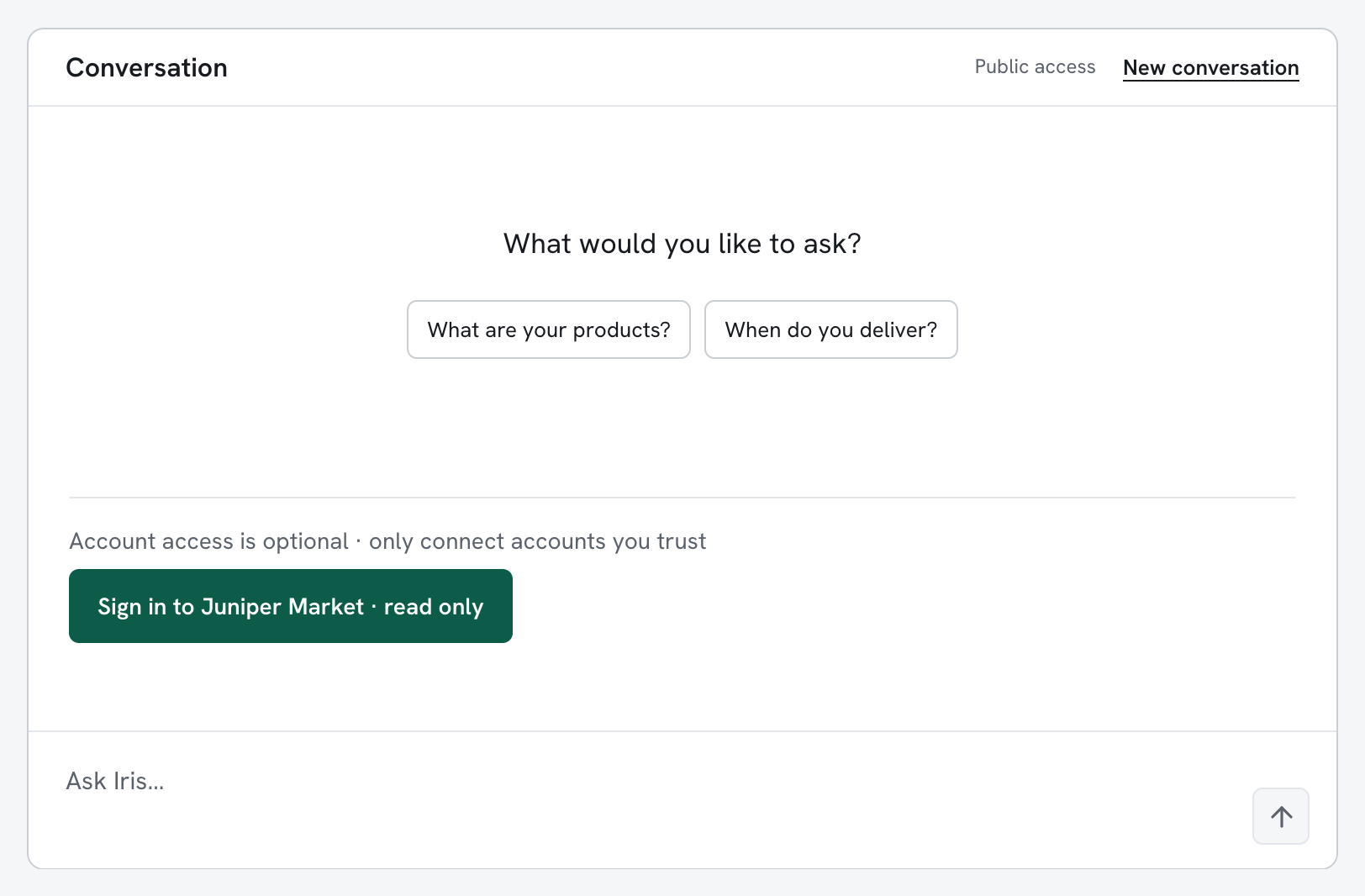
Iris can ask Juniper public questions. Elena's account is closed to it. Iris has found Juniper and can ask what any visitor could ask, such as what the shop sells. The conversation is marked Public access. Elena's deliveries and orders belong to her account, and Iris has no access to it. Connecting to a company covers this first contact.
The green button says what Iris will ask for: access to read, and nothing more. Before she presses it, Elena asks what the shop sells, and Iris answers with Juniper's four products.
Sign in at Juniper
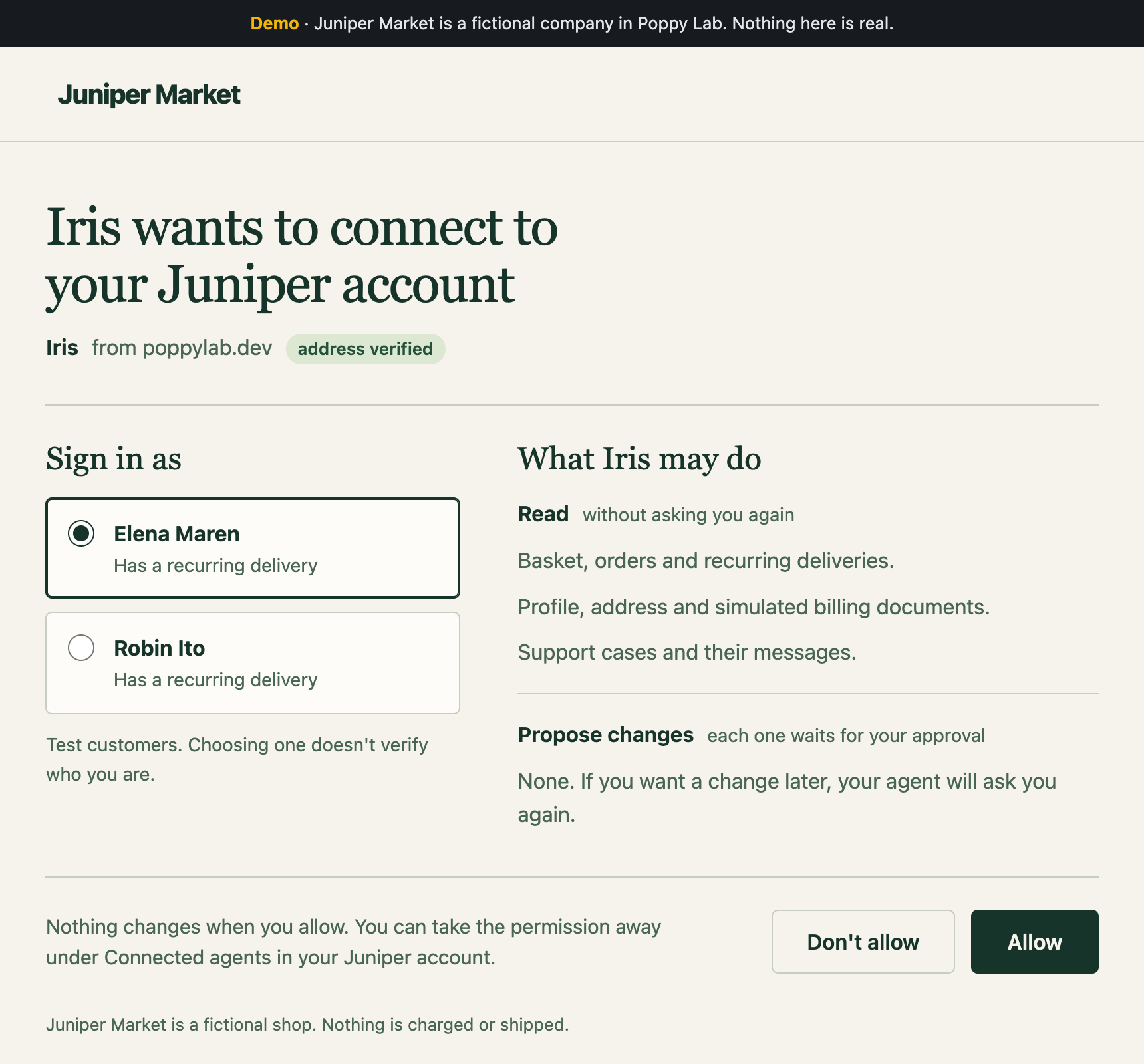
This page belongs to Juniper. Iris only opened it. The button opens a page on Juniper's website, in Juniper's design and in its words. At the top it says which agent is asking: Iris, from poppylab.dev, with a note that the address is verified. On the right it lists what Iris would be allowed to read, and under Propose changes it says "None". Elena chooses Allow.
Elena signs in at Juniper and never in Iris, so Iris never sees a password. What it receives from Juniper is a permission tied to Iris itself. The lab's companies have test customers and no passwords, which is why the page offers two names to choose from.
What travelled
Iris sent the sign-in request to Juniper directly and opened the consent page with a reference to it, so the request cannot be altered in the browser. After Elena allowed it, Juniper sent the browser back to Iris with a one-time code, and Iris exchanged the code for an access token bound to its own key.
Request Who makes it POST /oauth/parIris GET /oauth/authorizeand the consentElena POST /oauth/tokenIris One task, request by request shows these requests.
Iris reads the account
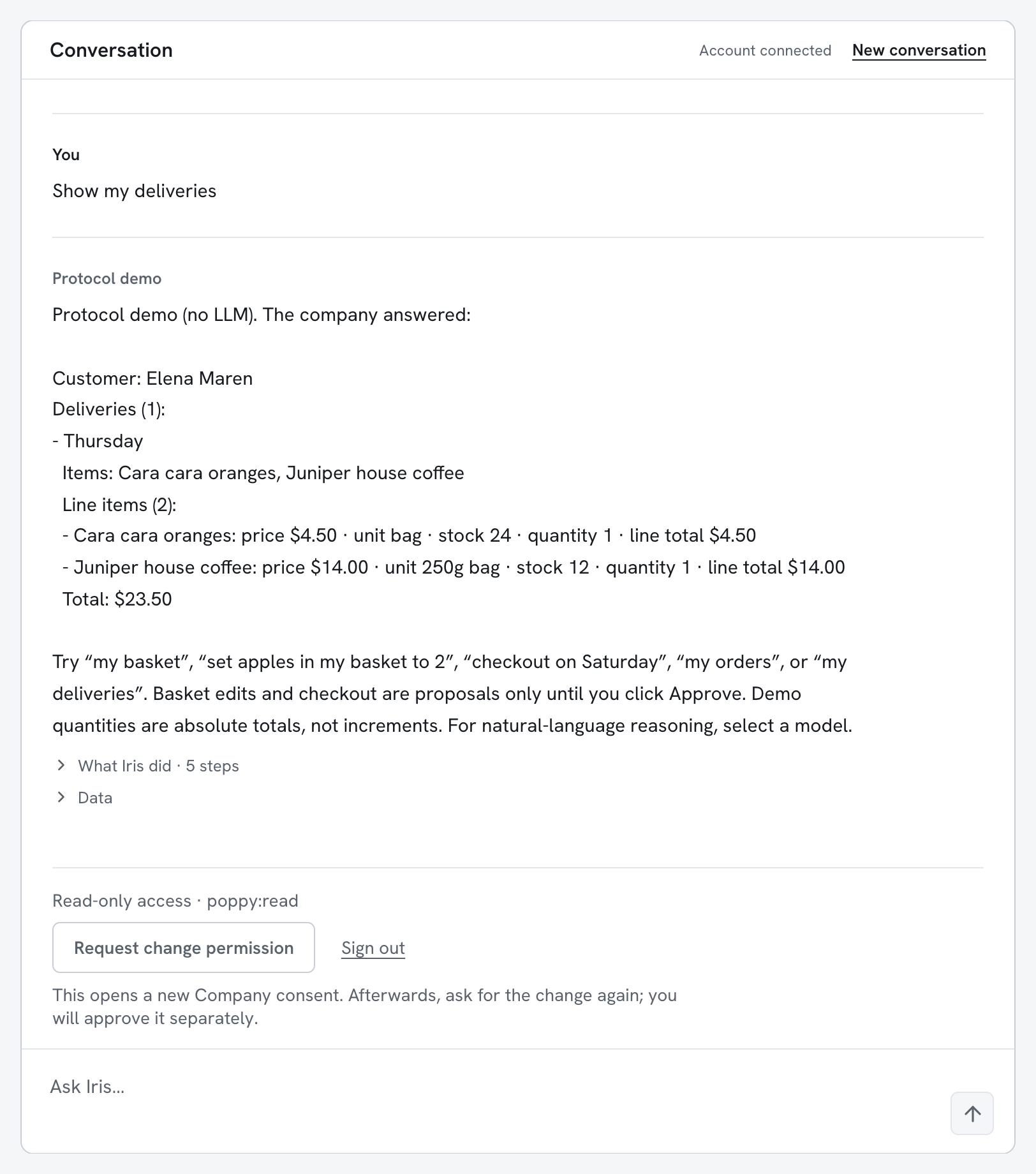
With read-only access Iris can see the delivery and cannot propose a change to it. The tab that held Juniper's page now shows a page of the lab that reads "Signed in to Juniper Market." and offers to close the tab. Back in the conversation, Elena asks for her deliveries and Iris reads them from Juniper: one delivery every Thursday, with oranges and coffee. She asks for her orders too, and Juniper answers that there are none yet.
The line under the answer states what Iris may do at this point: read-only access. Next to it are the two things Elena can do about that. She can ask for change permission, or sign out.
What travelled
Started a Poppy Session, signed in
Read /poppy/tasks
Company Agent conversations at https://grocery-demo.poppylab.dev/poppy/conversations
Found 19 API tools at the Company
Read /api/account/deliveries
Juniper's answer, trimmed to one of the two products:
{
  "customer": "Elena Maren",
  "deliveries": [
    {
      "id": "delivery_001",
      "day": "Thursday",
      "items": ["Cara cara oranges", "Juniper house coffee"],
      "line_items": [
        {
          "id": "oranges",
          "name": "Cara cara oranges",
          "price": 450,
          "unit": "bag",
          "stock": 24,
          "quantity": 1,
          "line_total_cents": 450
        }
      ],
      "total_cents": 2350,
      "currency": "USD",
      "version": 1
    }
  ]
}
The request carried the access token from the sign-in. Juniper checked that the token allows
poppy:readbefore it answered.Juniper lists the agent
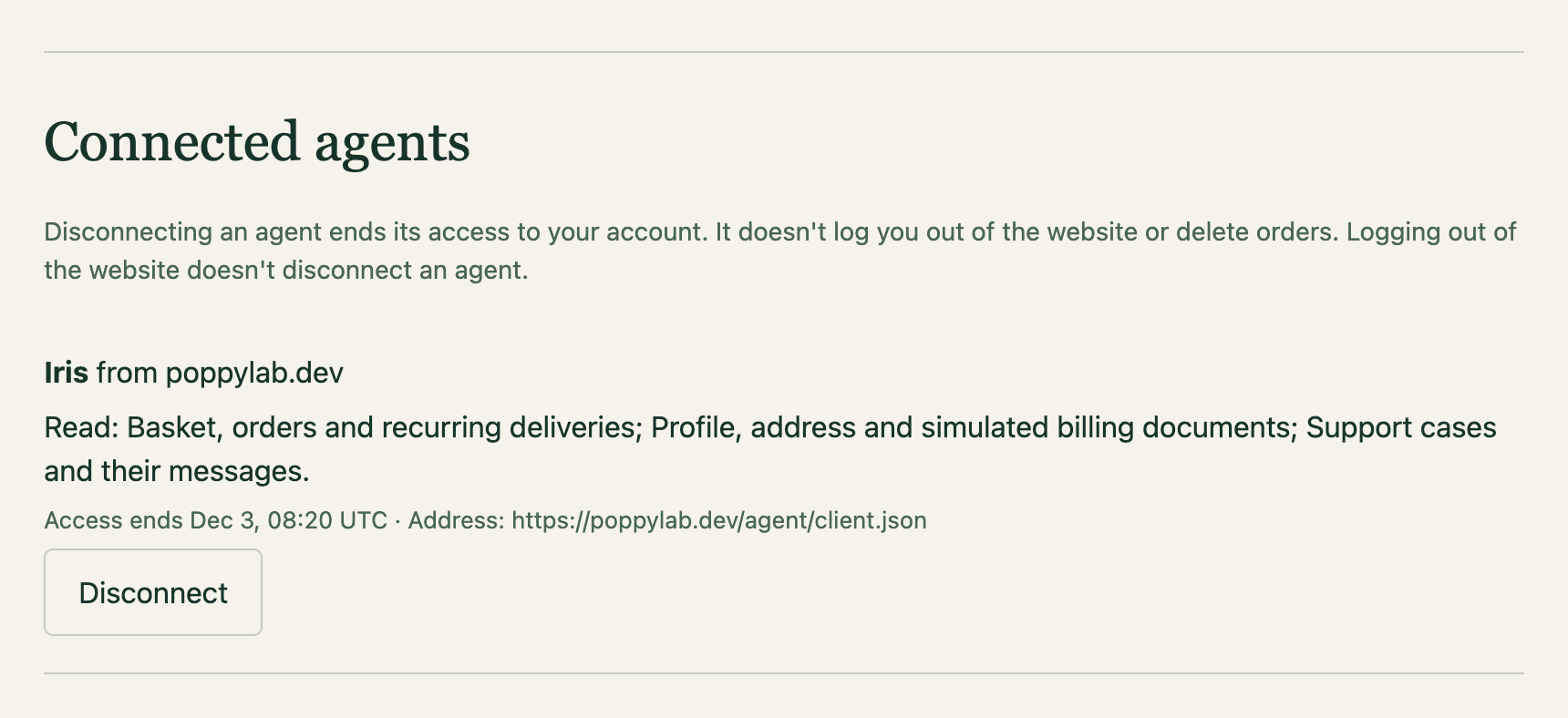
Juniper shows Elena which agent is connected and what it may do. Elena opens Juniper's website herself and looks at her account. Under Connected agents, Juniper lists the agent that has been reading it, in the words of its consent page: Iris from poppylab.dev, what it may read, and the date on which the access ends. The agent's address stands next to that date.
The record of who may reach her account is kept by Juniper, where Elena would look for it. The Disconnect button ends the access from Juniper's side.
Ask for a change too early
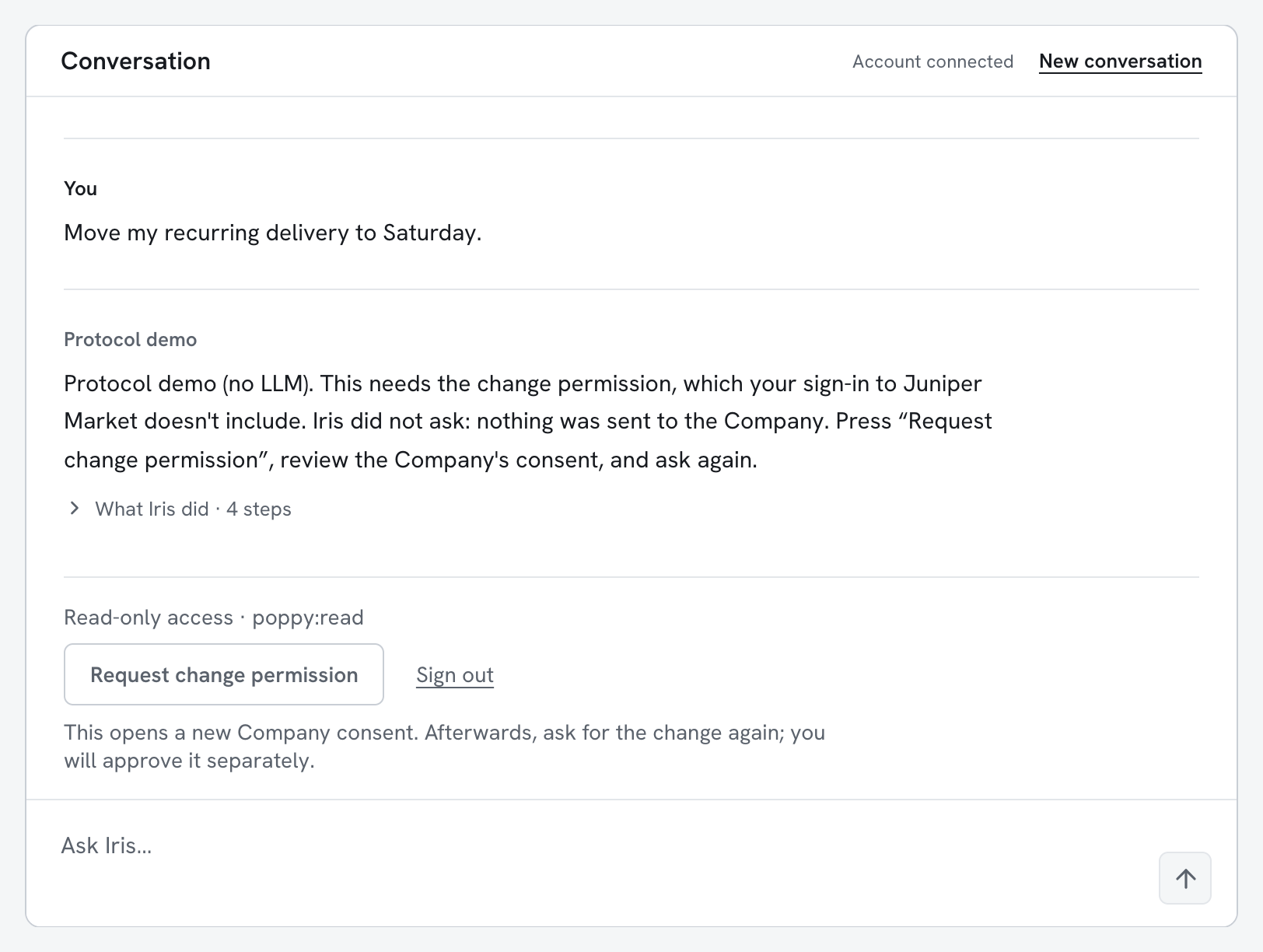
Reading and changing are separate permissions, and Iris holds only the first. Elena asks Iris to move the delivery to Saturday. Iris does not send the request. Juniper's API says that proposing a change needs a second permission, and Elena gave only the one to read. Nothing changed: Juniper's website still showed Thursday and no proposal from the agent.
The answer says what is missing and what happened: the request needs the change permission, Iris did not ask, and nothing was sent to Juniper. It also tells Elena what to do: request change permission, review Juniper's consent, then ask again.
What travelled
The steps under the answer end with the request that Iris did not make. The Inspector lists it as "Not sent · POST /api/account/delivery-change · permission not granted".
Started a Poppy Session, signed in
Company Agent conversations at https://grocery-demo.poppylab.dev/poppy/conversations
Found 19 API tools at the Company
Did not ask for /api/account/delivery-change (permission not granted); nothing was sent
The entry in Juniper's API description that names both permissions, trimmed:
{
  "/api/account/delivery-change": {
    "post": {
      "operationId": "propose_delivery_change",
      "summary": "Propose a new recurring delivery day.",
      "x-poppy-scopes": ["poppy:read", "poppy:write"]
    }
  }
}
Allow Iris to propose changes
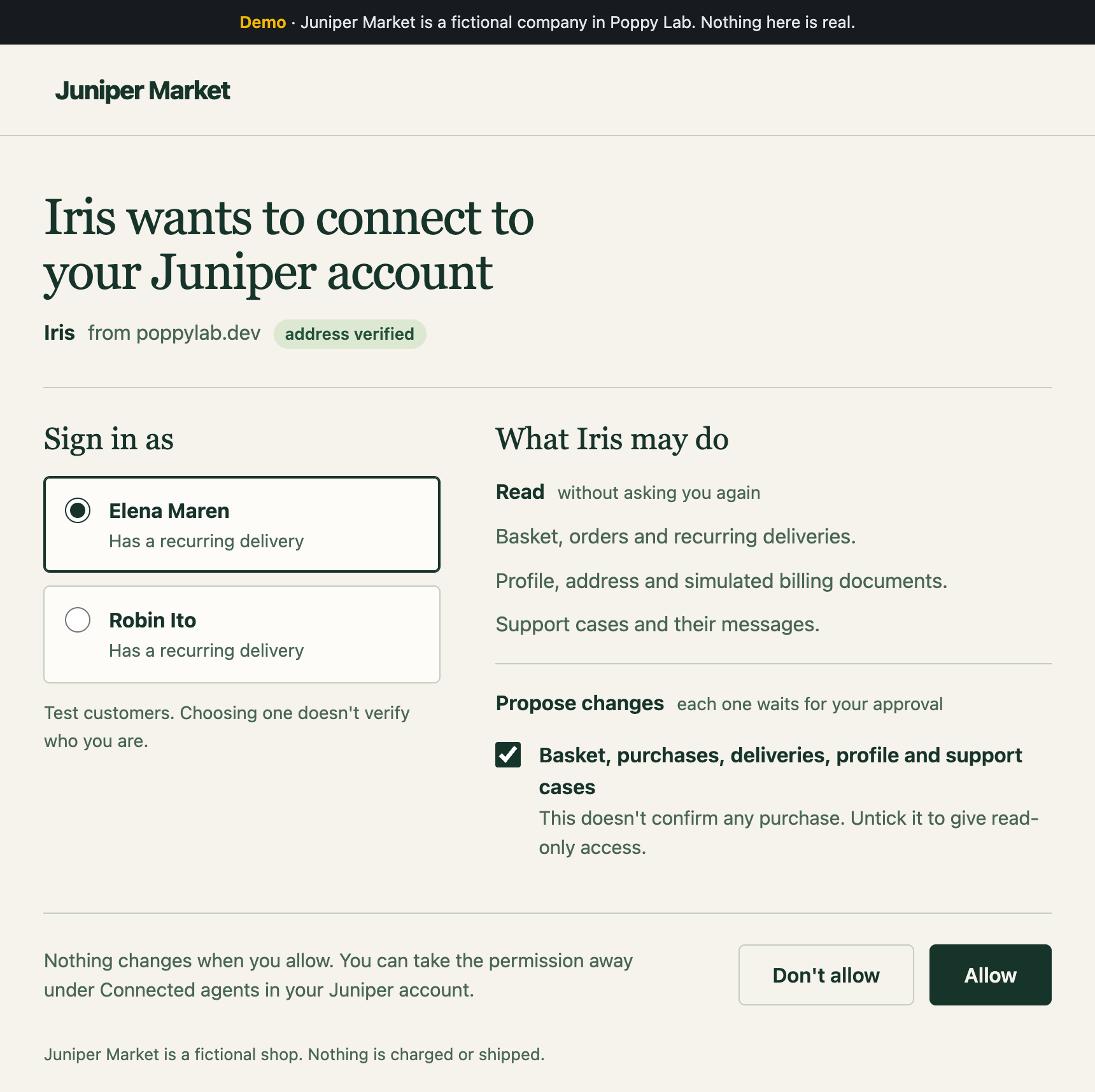
The second consent adds one permission, named in Juniper's words. Elena presses Request change permission and Juniper's page opens again, with her account already selected. This time it names one more thing Iris could do: propose changes to the basket, purchases, deliveries, the profile and support cases. Elena can untick the box and stay with read-only access.
The page also says what the permission does not do. Each change waits for Elena's own approval, and the permission confirms no purchase. Juniper decides how its permissions are split and how each one is described. A bank or an airline would draw the lines elsewhere.
What travelled
The same three requests as in step 2. Iris asked for both permissions together, and the new access replaced the old one. Step 10 shows the one entry Juniper lists for Iris afterwards, with both permissions.
Ask again
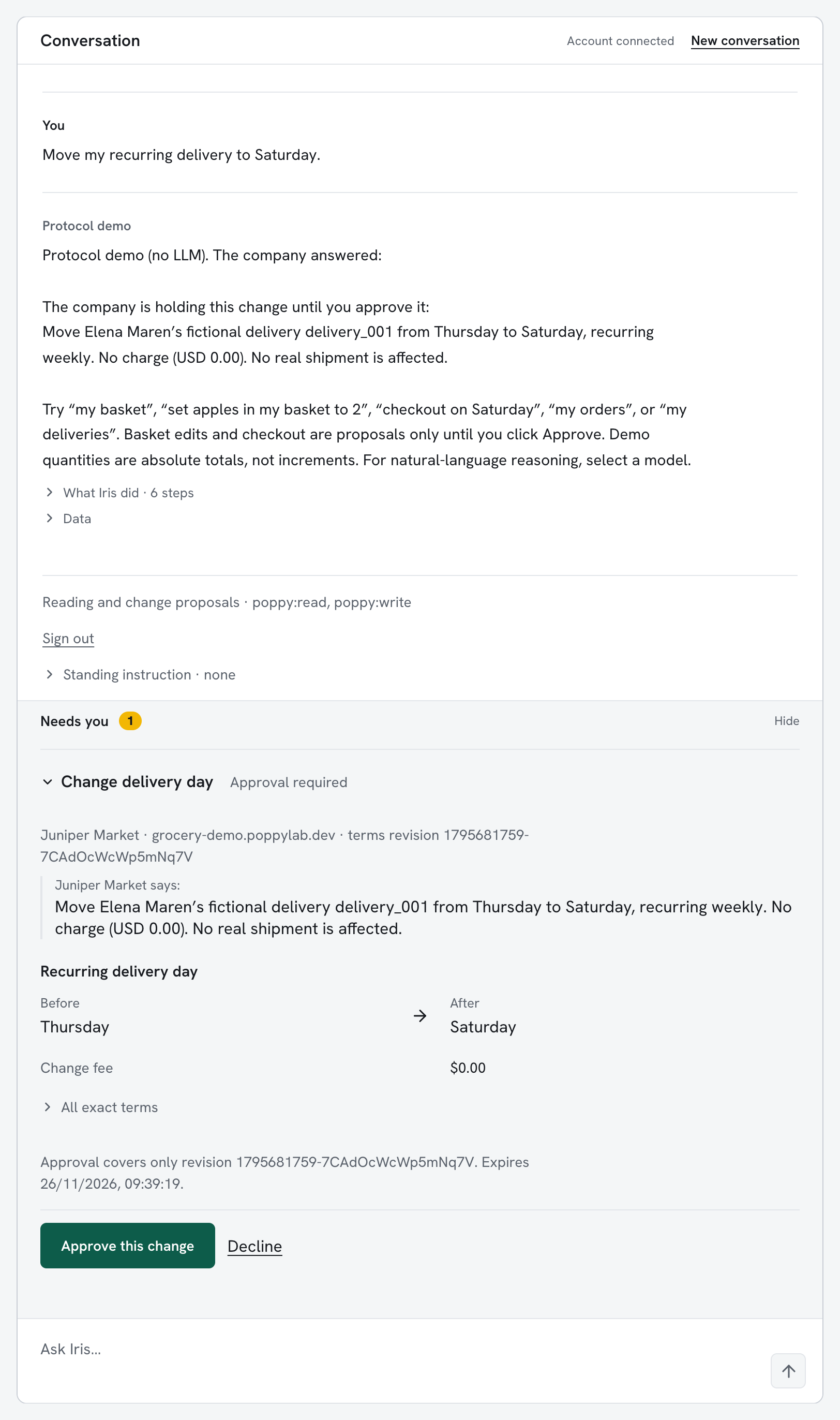
With the second permission Iris may ask. Juniper still waits for Elena. The line under the conversation now reads "Reading and change proposals". Elena asks again for Saturday, and this time Iris sends the request. Iris does not repeat the earlier request by itself. When the access changed, what had been said since the sign-in left the conversation: her deliveries, her orders and the request Iris had not sent. Her question from before the sign-in stayed, with its answer.
Juniper does not make the change. It answers that the change needs the customer's approval and sends back the terms it would apply: the delivery moves from Thursday to Saturday, at no charge. Iris shows them in a panel called Needs you.
What travelled
Started a Poppy Session, signed in
Read /poppy/tasks
Company Agent conversations at https://grocery-demo.poppylab.dev/poppy/conversations
Found 19 API tools at the Company
Sent a request to /api/account/delivery-change
Asked for your approval; nothing was done yet
Juniper's answer to the request, as Iris received it:
{
  "status": "approval_required",
  "operation_id": "op_eV-2oYC-g9rLk80kY4vyLGin",
  "summary": "Move Elena Maren’s fictional delivery delivery_001 from Thursday to Saturday, recurring weekly. No charge (USD 0.00). No real shipment is affected.",
  "terms": {
    "kind": "delivery",
    "delivery_id": "delivery_001",
    "from": "Thursday",
    "delivery_version": 1,
    "to": "Saturday",
    "fee_cents": 0,
    "currency": "USD"
  },
  "expires_at": "2026-11-26T08:39:19.266Z"
}
Approve
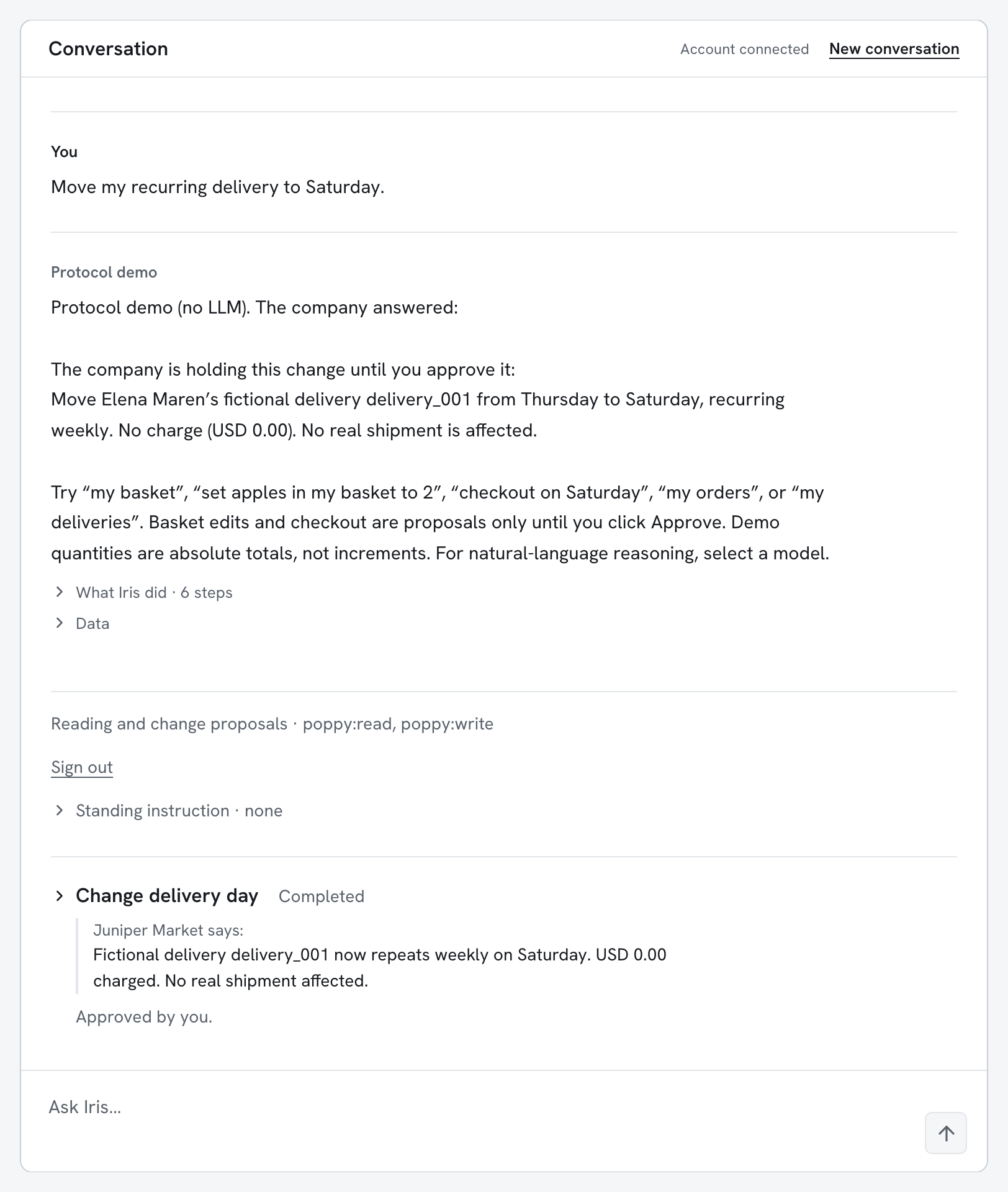
Juniper made the change when the approval arrived, and said so. Elena presses Approve this change. Iris sends Juniper the same request again, this time with her approval attached, and Juniper confirms: the delivery now repeats weekly on Saturday.
The permission from step 6 allowed Iris to ask for the change. Elena's approval is what allowed Juniper to make it. Changing an order follows an approval in detail: what the terms contain, what the approval covers and when it expires.
Check the delivery at Juniper
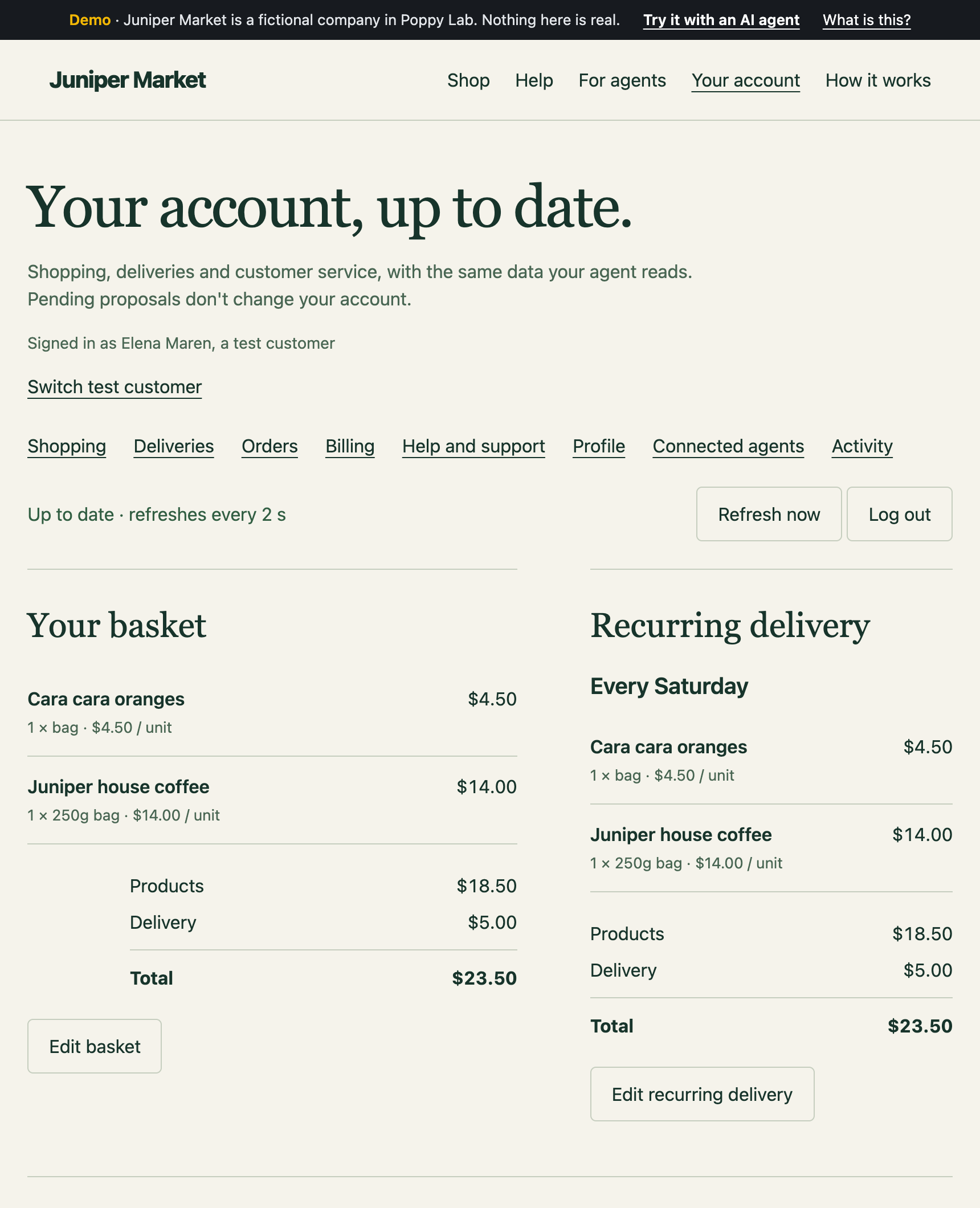
The changed delivery on Juniper's website, a few seconds later. Juniper's website shows the delivery as it now stands: every Saturday, with the same two products. Lower on the page, Elena opens Your agent's activity. There Juniper records that the change was applied, at what time, and that Elena approved it in her agent.
See what the agent may do now
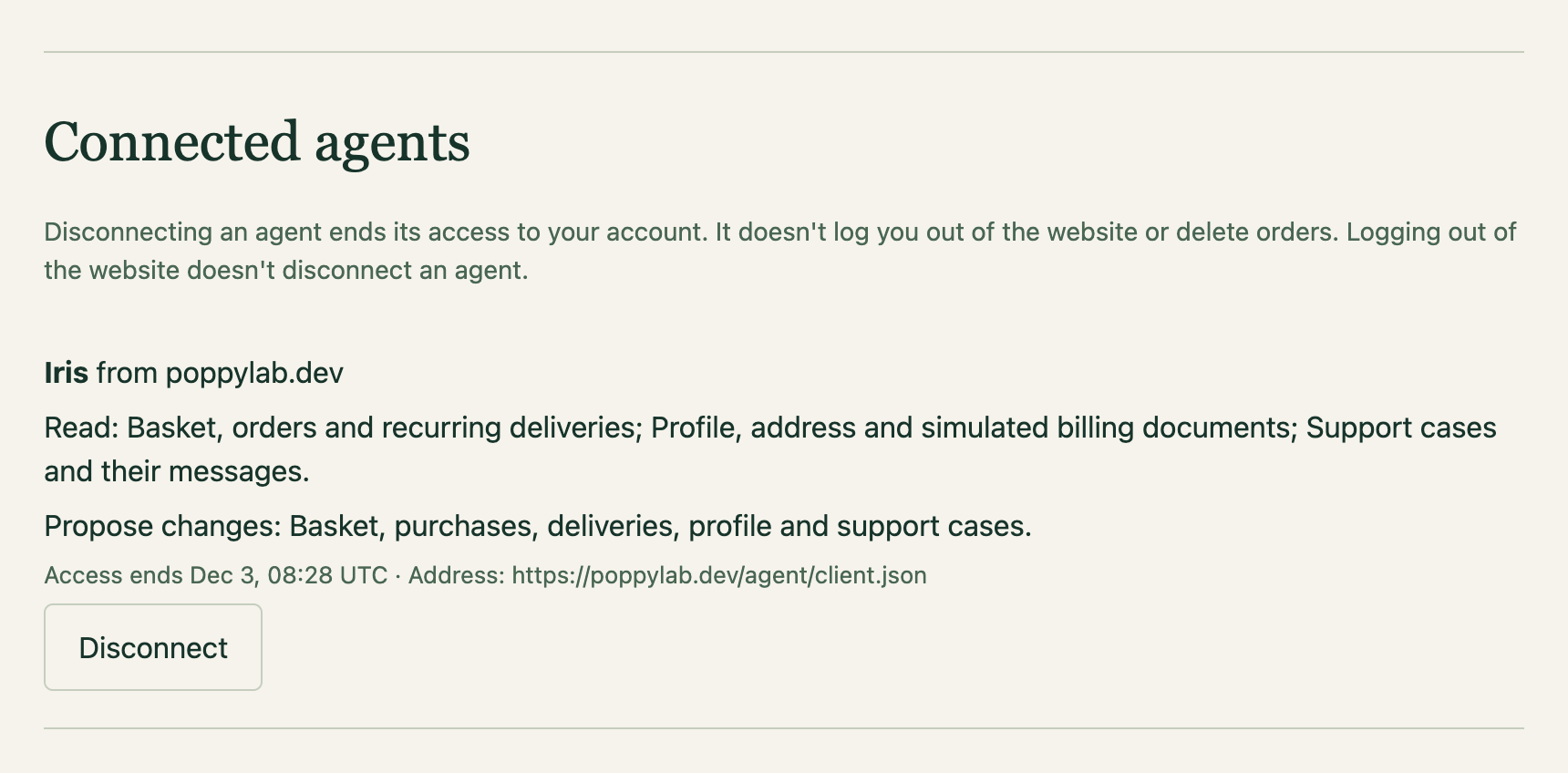
One agent, two permissions, and the same Disconnect button. Under Connected agents, Juniper now lists the same agent with both permissions, each in the words of its consent page. Elena presses nothing: the page keeps the list current while it is open. There is one entry, because the second consent replaced the first.
Sign out
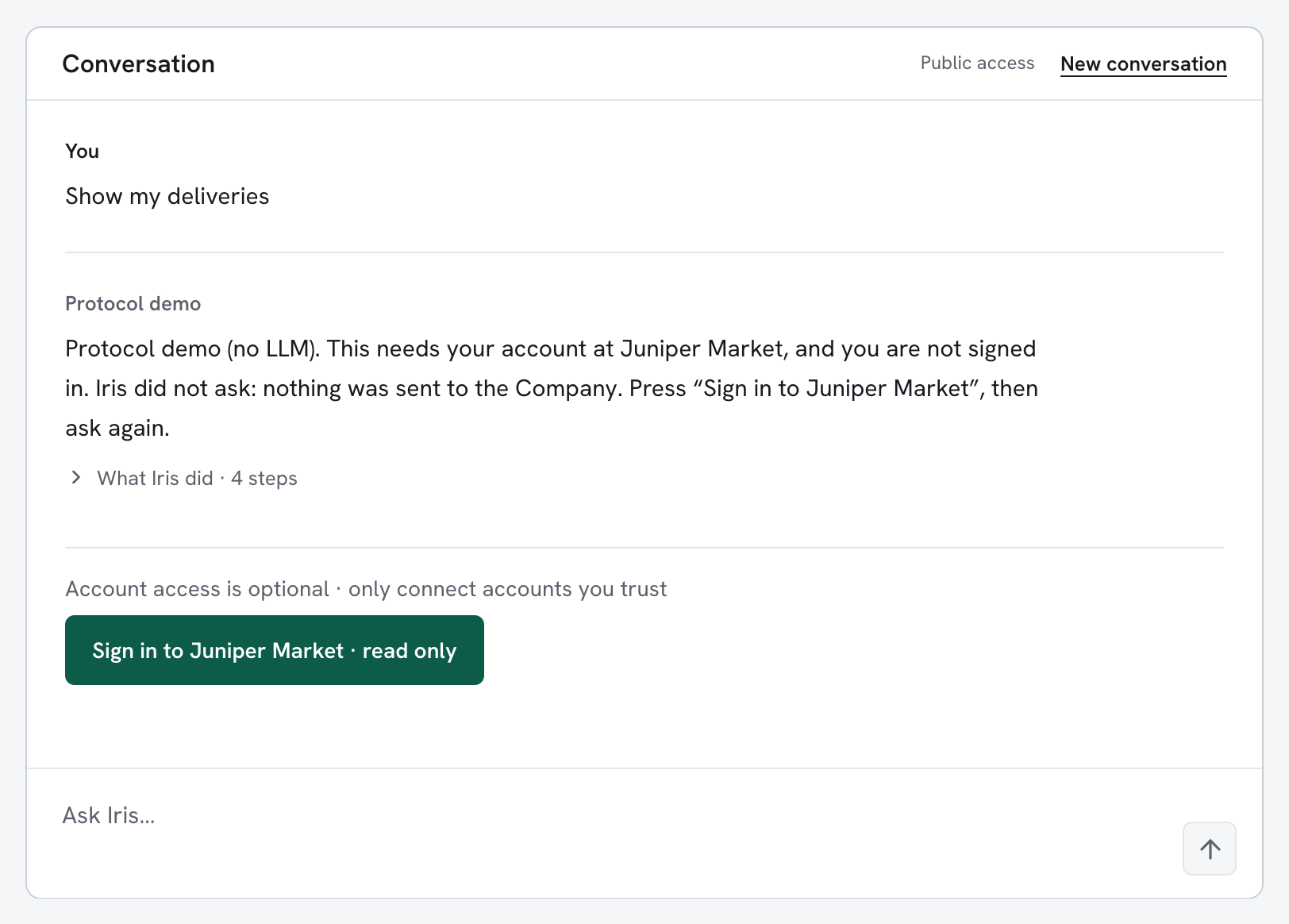
After Sign out, Iris is back to what any visitor can ask. Elena presses Sign out in the conversation. The conversation is emptied and marked Public access again. When she asks for her deliveries, Iris answers as it would have before she signed in: the request needs her account, she is not signed in, and nothing was sent to Juniper.
What travelled
Signing out is a request from Iris to Juniper to revoke the access it was given (
POST /oauth/revoke). Juniper lists the address for it on its For agents page, and step 12 shows the effect on Juniper's side.Check at Juniper that the access ended
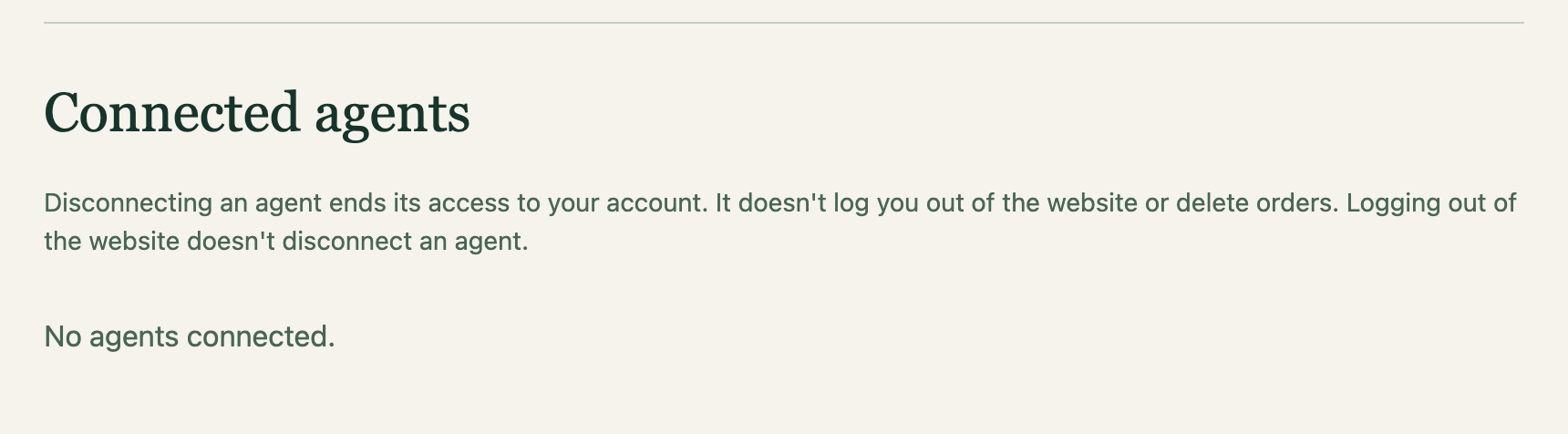
Juniper no longer lists the agent. Elena looks at Juniper's page once more. The list has updated itself and reads "No agents connected". The delivery she moved stays on Saturday, because signing out ends the access and undoes nothing.
Elena can also end the access from Juniper's side, with the Disconnect button on this page. When she does, Juniper refuses Iris's next request. Iris tells her that Juniper no longer accepts the access, and the answers it got with her account leave the conversation.
What Juniper controls
Juniper stays in charge of the customer's account throughout.
- The sign-in and both consents happen on its own pages, with its own wording. The agent never handles a password.
- It defines the permissions and keeps reading separate from proposing changes.
- It checks the permission on every request for account data.
- The permission to propose changes lets the agent ask. Juniper makes a change only when the customer's approval arrives.
- It lists the connected agent for the customer and can end the access itself.
- It shows the customer what the agent asked for recently and what was done.
For the technical reader
The Inspector view of the playground lists each call behind the screens above, without the secrets. One task, request by request walks through the sign-in requests, and Approvals with Operations describes what the company checks when an approval arrives.